

Description
Download The Camelizer – Price‑Watching, Historical Price Charts, and Smart Shopping Tool
Overview
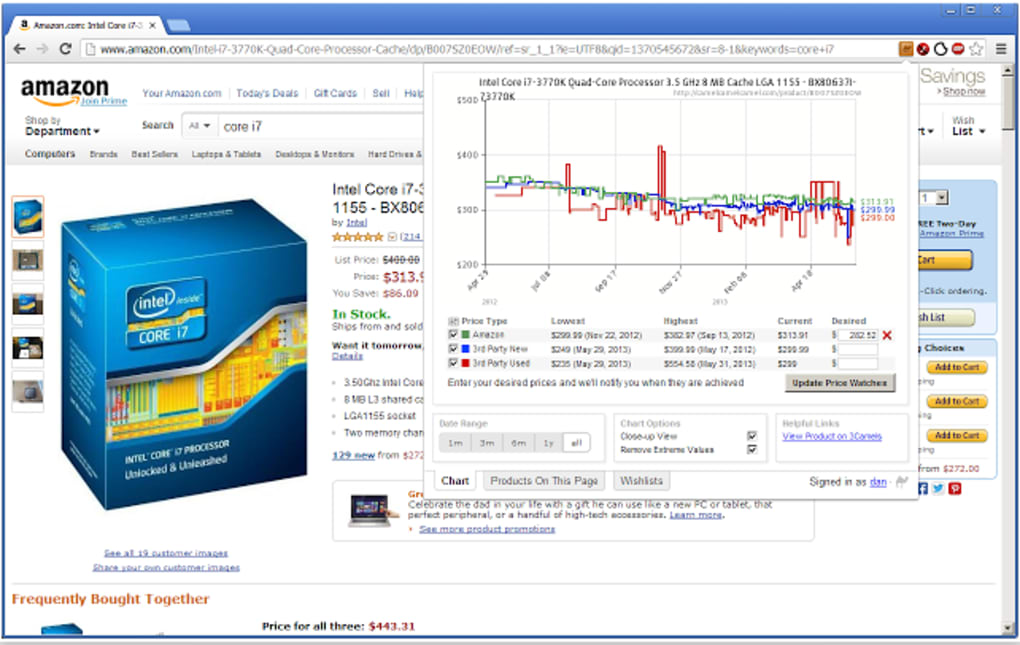
The Camelizer is a lightweight browser plug‑in that turns every online shopping session into a data‑driven decision‑making process. Developed by the team behind the renowned price‑tracking site CamelCamelCamel, the extension integrates directly into Google Chrome, Safari, and Mozilla Firefox. Once installed, a small icon appears on the address bar whenever you land on a supported retailer’s product page – most notably the full suite of Amazon’s international sites (US, UK, DE, FR, CA, CN, IT, ES, JP). By clicking that icon, a pop‑up window instantly displays a detailed price‑history chart, complete with low, high, and average values, as well as alerts for upcoming price drops. This eliminates the need to bounce to a third‑party website, saving you time, bandwidth, and the mental fatigue of juggling multiple tabs.
In today’s e‑commerce landscape, price volatility is the norm rather than the exception. Seasonal sales, flash deals, and algorithmic pricing can make a product’s cost swing dramatically within days. The Camelizer equips consumers with the historical context needed to answer the age‑old question: “Should I buy now, or wait for a better deal?” By leveraging Camel’s proprietary data, the tool provides a trustworthy snapshot of a product’s market‑price trajectory, helping you avoid overpaying and capitalise on genuine discounts. Whether you’re a bargain hunter, a small‑business owner sourcing inventory, or simply a casual shopper who wants assurance before clicking “Add to Cart,” The Camelizer delivers actionable insights at a glance.
Security and privacy are baked into the extension’s design. The plug‑in never collects personal browsing data beyond the URL of the product page you’re viewing, and all price information is pulled via HTTPS from Camel’s own servers. Updates are delivered automatically through the browser’s extension store, ensuring you always have the latest features and compatibility patches without any manual effort. In short, The Camelizer is the quintessential “download‑once, use‑forever” companion for anyone who shops online regularly.
Core Features and What Sets The Camelizer Apart
- Instant Price‑History Charts: Visual line graphs show daily, weekly, and monthly price movements, with colour‑coded markers for lowest and highest points.
- Global Amazon Coverage: Supports all major Amazon locales, so you can track prices whether you’re shopping from the US, UK, Germany, Japan, or any other supported market.
- One‑Click Access: A single toolbar icon brings the chart to the foreground without leaving the product page, keeping your shopping flow uninterrupted.
- Price Drop Alerts: Set custom threshold alerts; the extension notifies you via desktop notification or email when a product falls below your target price.
- Historical Data Export: Export price‑history data to CSV for deeper analysis or record‑keeping.
- Secure HTTPS Communication: All data is transmitted over encrypted connections, safeguarding your browsing privacy.
- Automatic Updates: The plug‑in receives seamless updates through the browser’s extension marketplace, ensuring compatibility with the latest browser versions.
- Lightweight Footprint: The extension consumes minimal RAM and CPU resources, making it suitable for both high‑end workstations and modest laptops.
- Multi‑Browser Support: Available for Chrome, Safari, and Firefox, covering the majority of desktop shoppers.
- Free Core Version: The basic functionality is completely free, with optional premium features for power users.
While there are other price‑tracking tools on the market, The Camelizer distinguishes itself by pulling data directly from Camel’s own database, which is renowned for its depth and accuracy. Competing extensions often rely on scraped data from multiple sources, which can result in inconsistencies or outdated information. The Camelizer’s direct integration means the charts you see are the same ones that power the CamelCamelCamel website, giving you confidence that the numbers are reliable.
Another advantage lies in the user‑experience design. The pop‑up window is responsive and adapts to different screen resolutions, ensuring readability on high‑DPI monitors and even on lower‑resolution laptops. The colour scheme respects both light and dark browser themes, reducing eye strain during long browsing sessions. Moreover, the alert system is highly configurable – you can choose to be notified only for price drops of a certain percentage, a fixed monetary amount, or when the price falls below a specific value you set.
For developers and data enthusiasts, the CSV export feature opens up possibilities for custom analysis, integration with spreadsheet tools, or feeding data into personal budgeting apps. This level of flexibility is rarely offered by free extensions, underscoring The Camelizer’s commitment to serving both casual shoppers and power users alike.
Installation, Usage Instructions, and Compatibility
Getting The Camelizer up and running is straightforward and takes less than a minute on any supported browser. Follow these steps to install and start using the tool:
- Open your preferred browser (Chrome, Safari, or Firefox) and navigate to the official extension store – Chrome Web Store, Safari Extensions Gallery, or Mozilla Add‑Ons.
- Search for “The Camelizer” or use the direct link provided on CamelCamelCamel’s website.
- Click the “Add to Browser” button and confirm any prompts that appear. The extension will download and install automatically.
- Once installed, you’ll see a small camel icon appear on the right side of the address bar. No additional configuration is required for basic usage.
- Visit an Amazon product page (or any other supported retailer). The camel icon will become active, indicating that price history data is available for that item.
- Click the icon. A compact window slides down, displaying a line chart, current price, historical low and high, and a “Set Alert” button.
- If you wish to receive price‑drop notifications, click “Set Alert,” enter your target price, and choose your preferred notification method (desktop pop‑up or email).
Operating System Compatibility (itemprop="operatingSystem"): The Camelizer works on any desktop operating system that supports the three major browsers: Windows 10/11, macOS Ventura and later, and most Linux distributions with Chrome or Firefox. Mobile versions of the browsers are not currently supported, as the extension relies on desktop‑only APIs for toolbar integration.
Troubleshooting Tips: If the icon does not appear on a product page, ensure the retailer is on the supported list (Amazon’s international domains are the primary focus). Also, verify that the extension is enabled in your browser’s extensions manager. Occasionally, ad‑blockers or privacy extensions may interfere; adding an exception for camelcamelcamel.com usually resolves the issue.
The extension updates automatically, but you can manually check for updates by visiting the extensions page in your browser and clicking “Update.” Regular updates keep the price‑history database current and ensure compatibility with any changes to retailer page structures.
Pros, Cons, and Frequently Asked Questions
Pros
- Provides accurate, historical price data directly from Camel’s trusted database.
- One‑click access without leaving the retailer’s product page.
- Supports all major Amazon locales, covering a global audience.
- Free core version with optional premium upgrades.
- Customizable price‑drop alerts and CSV export for advanced analysis.
- Lightweight and secure, with HTTPS communication.
Cons
- Limited to desktop browsers; no native mobile support.
- Only works with retailers that Camel tracks – not all e‑commerce sites are covered.
- Advanced alert features require a premium subscription.
FAQ (itemtype="https://schema.org/FAQPage")
-
Is The Camelizer completely free?
The core functionality – viewing price‑history charts and setting basic alerts – is free. Premium features such as advanced alert thresholds, multi‑product monitoring, and priority support are available through a paid subscription.
-
Which browsers are officially supported?
The Camelizer is available for Google Chrome, Mozilla Firefox, and Safari on desktop platforms. Extensions are distributed through each browser’s official add‑on store.
-
Can I use The Camelizer on Amazon’s non‑US sites?
Yes. The extension supports Amazon’s major international domains, including the UK, Germany, France, Canada, China, Italy, Spain, and Japan, providing localized price history for each market.
-
How does The Camelizer protect my privacy?
The extension only sends the current product URL to Camel’s servers over an encrypted HTTPS connection. No personal browsing history, search queries, or identifiable data are collected or stored.
-
What should I do if the price chart does not appear?
First, confirm the retailer is supported. Then, ensure the extension is enabled and not blocked by any other privacy add‑ons. If the problem persists, refresh the page or reinstall the extension from the official store.
Conclusion and Call‑to‑Action
The Camelizer bridges the gap between curiosity and confidence when shopping online. By surfacing decades of price data with a single click, it empowers you to make smarter purchasing decisions, avoid buyer’s remorse, and potentially save hundreds of dollars over time. Its seamless integration, robust feature set, and free core offering make it a must‑have tool for anyone who frequents Amazon or other supported retailers.
If you’re ready to take the guesswork out of online shopping, simply download The Camelizer from your browser’s extension store today. Install it in seconds, start viewing price histories instantly, and set up alerts that notify you when your favorite products finally drop to a price you’re comfortable with. Join the millions of savvy shoppers who already rely on Camel’s data to stay ahead of market trends.
Guides & Tutorials for The Camelizer
How to install The Camelizer
- Click the Preview / Download button above.
- Once redirected, accept the terms and click Install.
- Wait for the The Camelizer download to finish on your device.
How to use The Camelizer
This software is primarily used for its core features described above. Open the app after installation to explore its capabilities.
User Reviews for The Camelizer 0
No reviews found





